omnillm
OmniLLM
Enterprise-ready multi-provider LLM gateway.
Quick Start | Capabilities | Providers | Architecture | ToolConfig | API Reference | Security | Development
OmniLLM is a unified control plane and gateway for LLM model access. It sits between your applications/agents and upstream LLM providers, translating requests through a Canonical Intermediate Format (CIF) so any client can talk to any provider regardless of API shape.
What it does:
- Exposes OpenAI-compatible (
/v1/chat/completions,/v1/models,/v1/embeddings,/v1/responses) and Anthropic-compatible (/v1/messages,/v1/messages/count_tokens) endpoints from a single gateway - Routes AI traffic across 7+ provider types (GitHub Copilot, Alibaba DashScope, Azure OpenAI, Google, Kimi, Antigravity, any OpenAI-compatible endpoint) with priority-based failover
- Centralizes provider authentication, model discovery, and runtime administration
- Provides a redesigned web admin console for live provider switching, log streaming, config editing, and virtual model management
- Manages configuration files for popular AI coding agents (Claude Code, Codex, Droid, OpenCode, AMP)
Route AI traffic through a controlled internal endpoint instead of binding applications directly to individual providers.
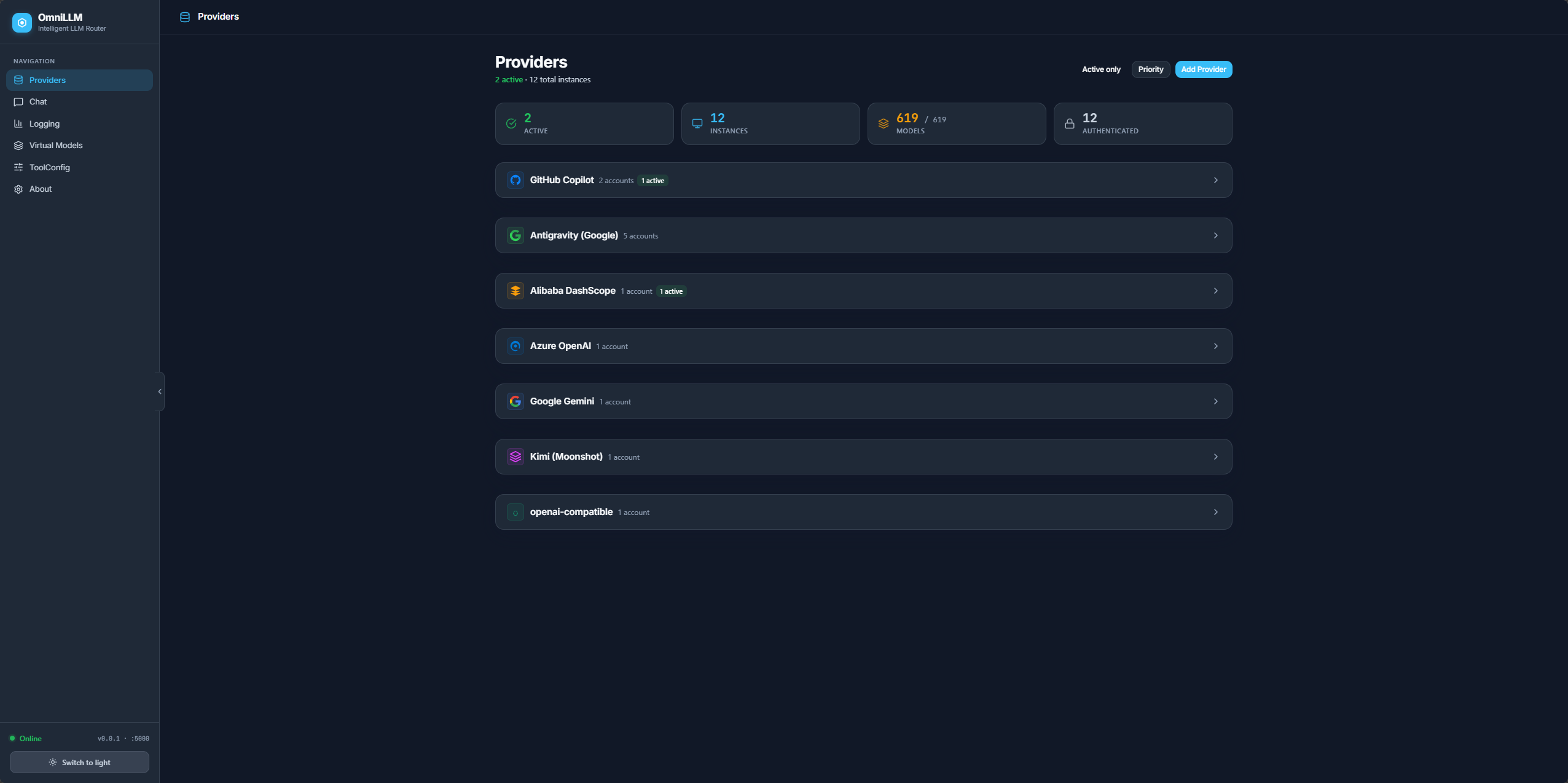
Chat
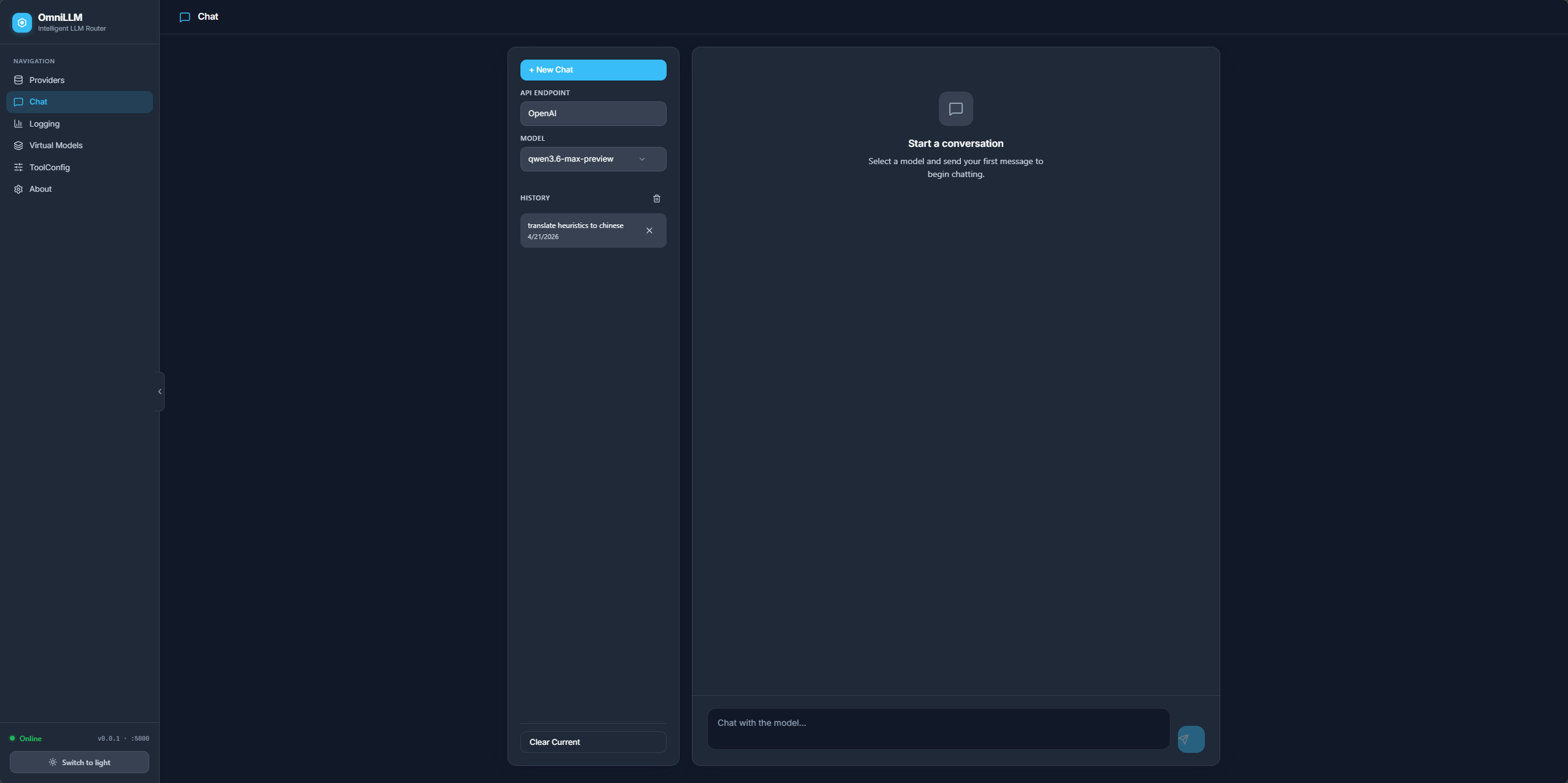
Virtual Models
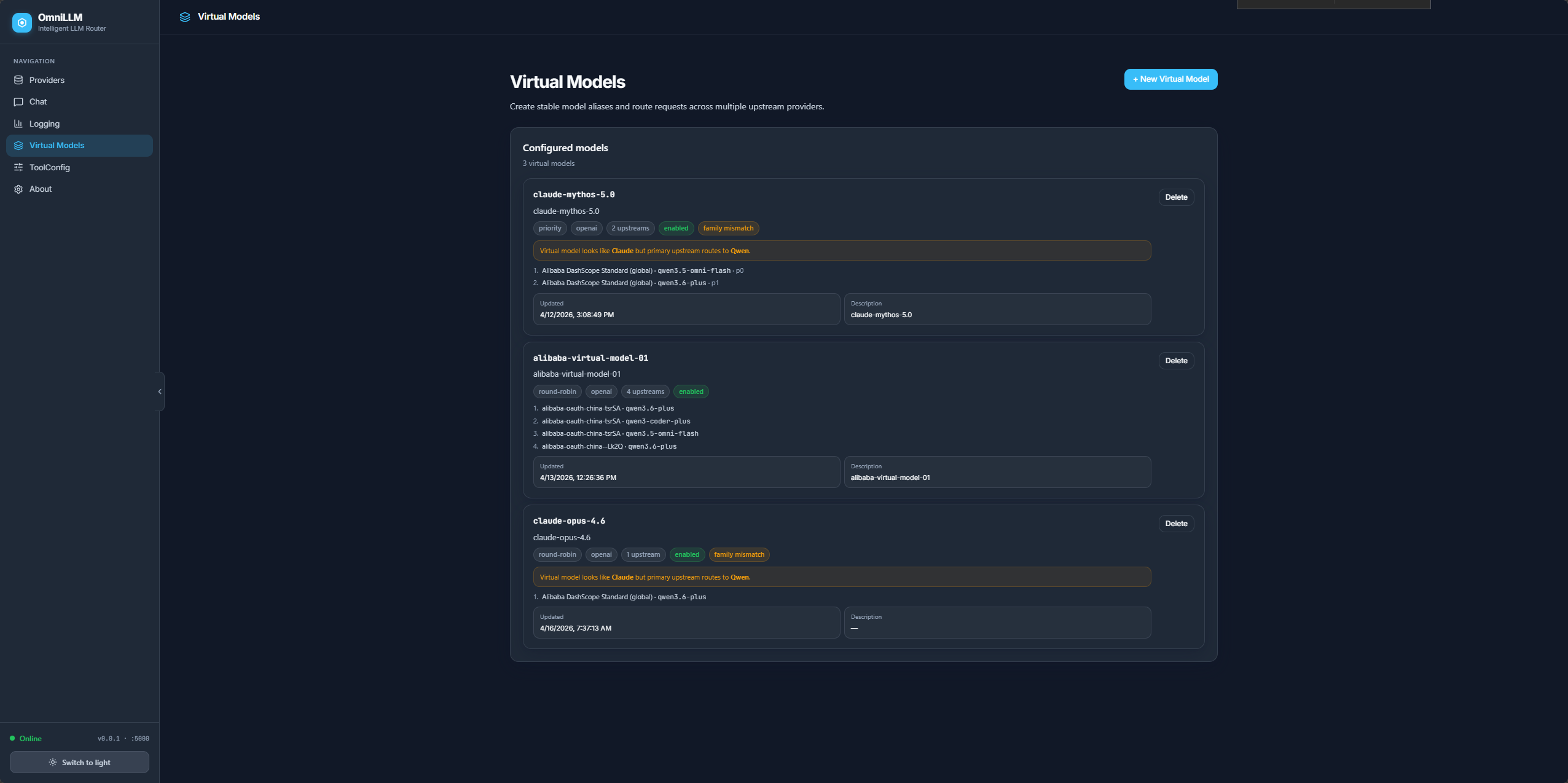
Admin Demo
Quick Start
Prerequisites
Development mode
bun run dev
Starts both backend (Go, port 5000) and frontend (Vite, port 5080). Admin UI at http://localhost:5080/admin/.
API key setup
All API routes are protected by an API key. On first start, OmniLLM auto-generates a random key and persists it to ~/.config/omnillm/api-key. You can either set a known key upfront or use the auto-generated one.
Option A: Set a known key (recommended)
# Via CLI flag
bun run omni start --api-key my-secret-key

# Or via environment variable
OMNILLM_API_KEY=my-secret-key bun run omni start
On Windows (PowerShell), set the environment variable before running:
$env:OMNILLM_API_KEY = "my-secret-key"
bun run omni restart --rebuild --host localhost --server-port 5000 --frontend-port 5080 -v
Option B: Pre-create the key file
# macOS / Linux
mkdir -p ~/.config/omnillm
echo -n "my-secret-key" > ~/.config/omnillm/api-key
bun run omni restart --rebuild --host localhost --server-port 5000 --frontend-port 5080 -v
On Windows (PowerShell):
New-Item -ItemType Directory -Force -Path "$env:USERPROFILE\.config\omnillm"
"my-secret-key" | Set-Content -NoNewline -Path "$env:USERPROFILE\.config\omnillm\api-key"
bun run omni restart --rebuild --host localhost --server-port 5000 --frontend-port 5080 -v
Option C: Use the auto-generated key
Start the server without specifying a key — OmniLLM generates a random one and persists it:
bun run omni restart --rebuild --host localhost --server-port 5000 --frontend-port 5080 -v
On Windows (PowerShell):
bun run omni restart --rebuild --host localhost --server-port 5000 --frontend-port 5080 -v
Then read the key from the persisted file:
# macOS / Linux
cat ~/.config/omnillm/api-key

# Windows (PowerShell)
cat "$env:USERPROFILE\.config\omnillm\api-key"
Once you have the key, include it in API requests:
# Bearer token header
curl -H "Authorization: Bearer <your-api-key>" http://localhost:5000/v1/models

# Or x-api-key header
curl -H "x-api-key: <your-api-key>" http://localhost:5000/v1/models

# Or query parameter (for SSE streams)
curl "http://localhost:5000/api/admin/logs/stream?api_key=<your-api-key>"
Or on Windows (PowerShell):
$headers = @{ Authorization = "Bearer my-secret-key" }
Invoke-RestMethod -Uri "http://localhost:5000/v1/models" -Headers $headers
The admin UI automatically injects the key via a <meta> tag, so no manual auth is needed in the browser.
Background mode with service management
bun run omni start          # start both services
bun run omni status         # check status
bun run omni stop           # stop all services
bun run omni restart        # restart services
bun run omni restart --rebuild --host localhost  # rebuild Go binary + frontend, then restart
Run with bunx
bunx omnillm@latest start
Run with Docker
docker build -t omnillm .
docker run -p 4141:4141 -v $(pwd)/proxy-data:/root/.local/share/omnillm omnillm
The auto-generated API key persists in the mounted volume, so restarts reuse the same key. To set a known key:
docker run -p 4141:4141 -e OMNILLM_API_KEY=my-secret-key omnillm
Core Capabilities
Canonical Intermediate Format (CIF)
All incoming requests — regardless of API shape (OpenAI or Anthropic) — are parsed into a Canonical Intermediate Format (internal/cif/types.go). This normalized data model is what every provider adapter reads and writes, eliminating the need for pairwise format translations between N providers. Adding a new provider only requires implementing two adapters (to/from CIF) rather than 2N pairwise converters.
Unified API compatibility
OpenAI-style (/v1/chat/completions, /v1/models, /v1/embeddings, /v1/responses) and Anthropic-style (/v1/messages, /v1/messages/count_tokens) endpoints from a single gateway. Existing applications migrate with minimal integration changes — just point OPENAI_BASE_URL or ANTHROPIC_BASE_URL at OmniLLM.
Multi-provider routing with automatic failover
Manage multiple providers simultaneously. Switch the active backend without restarting. Provider priorities enable automatic failover — when a provider fails mid-request, OmniLLM transparently tries the next candidate in priority order.
Provider-prefix model routing — When multiple providers serve the same model name, you can disambiguate by prefixing the model with a provider ID or subtitle (e.g., provider-id:gpt-4o). This works for both direct model names and virtual model upstreams, and is resolved automatically by the model routing layer.
Virtual models
Define abstract model IDs that map to specific provider models with configurable load-balancing strategies (round-robin, random, priority, weighted). This creates an abstraction layer between application code and upstream providers, enabling model swaps without touching client configuration.
Centralized authentication
Provider authentication through CLI and admin workflows — OAuth device flow for GitHub Copilot, API key for Alibaba DashScope, and token-based auth for all others. Credentials are persisted in SQLite (pure Go, no CGO) and restored on restart.
Operational visibility
Admin console with provider status, model discovery, usage visibility, runtime metadata, live log streaming via SSE and WebSocket, and dynamic log-level control. Request logs include client IP and User-Agent for identifying which tool (Claude Code, Codex, Droid, etc.) is making requests.
Config file management (ToolConfig)
View, edit, import, and backup configuration files for popular AI coding agents directly from the admin UI: Claude Code, Codex, Droid, OpenCode, and Amp. Structured editors provide intuitive UI for each config format. Editing is gated behind the --enable-config-edit flag. Config backup creates timestamped copies in the same directory.
Streaming resilience
If an upstream SSE stream fails before any data is sent (connection error, timeout), OmniLLM automatically retries as a non-streaming request and re-streams the completed response locally to the client. This is used by the Alibaba adapter to work around DashScope SSE reliability issues.
Developer and agent integration
Works as a local gateway for Claude Code and other clients. Auto-generated API key injected into the admin UI via <meta> tag for seamless frontend authentication. The frontend auto-detects the backend port at runtime by probing known ports.
Supported Providers
| Provider | Authentication | Notes |
|---|---|---|
| GitHub Copilot | OAuth device flow or token | Requires active Copilot subscription |
| Alibaba DashScope | API key | Supports global and China regions; coding plan variant |
| OpenAI-Compatible | API key (optional) | Any OpenAI-compatible endpoint: Ollama, vLLM, LM Studio, llama.cpp, OpenAI |
| Azure OpenAI | API key | Configurable endpoint, API version, and deployments |
| API key | Generic Google provider | |
| Kimi | API key | Generic Kimi provider |
| Antigravity | Google OAuth | Requires Google OAuth client credentials |
New providers are registered with canonical instance IDs derived from their endpoint URL and API key suffix, ensuring stable identification across restarts.
Architecture
Clients / Agents / Internal Apps
            |
            v
        OmniLLM Gateway
   ┌─────────────────────────────────────────┐
   │  Inbound API Key Auth                   │
   │  (Bearer / x-api-key / SSE query)       │
   ├─────────────────────────────────────────┤
   │  Ingestion Layer                        │
   │  OpenAI format ──┐                      │
   │  Anthropic format├─► CIF (Canonical     │
   │  Responses API  ─┘   Intermediate       │
   │                      Format)            │
   ├─────────────────────────────────────────┤
   │  Model Routing + Priority Failover      │
   │  Virtual Model Resolution               │
   │  Rate Limiting + Manual Approval        │
   ├─────────────────────────────────────────┤
   │  Provider CIF Adapters                  │
   │  (Execute / ExecuteStream)              │
   ├─────────────────────────────────────────┤
   │  Serialization Layer                    │
   │  CIF ──► OpenAI format / Anthropic      │
   │         format (SSE or non-streaming)   │
   ├─────────────────────────────────────────┤
   │  Admin Console + SSE/WS Log Streaming   │
   │  SQLite Persistence (provider, tokens,  │
   │  configs, chat sessions, virtual models)       │
   └─────────────────────────────────────────┘
            |
            v
  GitHub Copilot / Alibaba DashScope / Azure OpenAI
  / Google / Kimi / Antigravity / Ollama / vLLM
  / OpenAI / any OpenAI-compatible endpoint
Key Components
| Package | Path | Purpose |
|---|---|---|
| Server | internal/server/ |
Gin HTTP server, route registration, CORS, auth middleware, admin UI serving, SSE/WebSocket log streaming |
| Routes | internal/routes/ |
HTTP handlers for chat, models, embeddings, messages, responses, usage, token, admin, config files, virtual models |
| Ingestion | internal/ingestion/ |
Parses incoming OpenAI/Anthropic/Responses requests into cif.CanonicalRequest with fail-fast validation for malformed input |
| CIF | internal/cif/ |
Canonical Intermediate Format — the normalized request/response data model all providers translate to/from |
| Serialization | internal/serialization/ |
Converts CIF responses back to the client’s expected API format (OpenAI SSE, Anthropic SSE, non-streaming JSON) |
| Providers | internal/providers/ |
Per-provider implementations (Copilot, Alibaba, Azure, Google, Kimi, Antigravity, OpenAI-Compatible, Generic) |
| Registry | internal/registry/ |
Thread-safe ProviderRegistry — manages registered providers, active provider selection, failover |
| Model Routing | internal/lib/modelrouting/ |
Resolves model names to candidate providers with caching |
| Virtual Model Routing | internal/lib/virtualmodelrouting/ |
Routes abstract virtual model IDs to specific provider models with load-balancing strategies |
| Database | internal/database/ |
SQLite persistence via modernc.org/sqlite (pure Go, no CGO) — provider instances, tokens, configs, chat sessions, virtual models |
| Security | internal/security/ |
SSRF protection for OpenAI-compatible endpoints |
| Rate Limiting | internal/lib/ratelimit/ |
Configurable rate limiter with optional queue-on-reject behavior |
| Approval | internal/lib/approval/ |
Manual request approval mode (--manual flag) |
| GitHub Service | internal/services/github/ |
GitHub Copilot-specific logic (token refresh, usage, quota) |
| Frontend | frontend/ |
React 19 + Vite + MUI/Tailwind v4 admin console |
Request Flow
- Client sends request (e.g.,
POST /v1/chat/completions) to OmniLLM - Auth middleware validates inbound API key (Bearer / x-api-key / query param)
- Logging middleware generates request ID, captures client IP and User-Agent
- Rate limiter checks throttling; if
--manualmode, prompts for operator approval - Ingestion parser deserializes body into
cif.CanonicalRequest - Model routing normalizes model name, resolves candidate providers from registry
- Provider iteration loops through candidates in priority order:
- Gets provider’s CIF adapter via
GetAdapter() - Remaps model name to provider’s internal naming
- Calls
Execute()(non-streaming) orExecuteStream()(streaming, returns Go channel) - On failure, tries next candidate (automatic failover)
- Gets provider’s CIF adapter via
- Serialization converts CIF response back to client’s expected API format
- Response sent back with structured logging of the full lifecycle
Tech Stack
Backend: Go 1.23, Gin, zerolog, Cobra CLI, modernc.org/sqlite (pure Go SQLite)
Frontend: React 19, Vite, MUI v7, Tailwind v4, Radix UI, Lucide icons, Sonner, TypeScript
Tooling: Bun (runtime + package manager), ESLint, simple-git-hooks + lint-staged
Deployment: Multi-stage Dockerfile (golang:1.23-alpine → oven/bun:1.2.19-alpine → alpine:3.20), standalone binary, or bunx omnillm@latest
Security
OmniLLM introduces several security controls to protect the gateway and upstream providers.
Inbound API authentication
All API routes are protected by an API key. The key is resolved in this order:
--api-keyCLI flagOMNILLM_API_KEYenvironment variable- Persisted file at
~/.config/omnillm/api-key - Auto-generated random key (persisted to the file above)
Authentication accepts Authorization: Bearer <key>, x-api-key: <key>, or ?api_key=<key> query parameter for SSE streams.
SSRF protection
OpenAI-compatible provider endpoints are validated against SSRF attacks. Localhost, loopback, private, and link-local addresses are rejected unless --allow-local-endpoints is set.
# Allow local endpoints (e.g. Ollama at localhost:11434)
bun run omni start --allow-local-endpoints
CORS
CORS is restricted to localhost, 127.0.0.1, and ::1 origins. EventSource connections receive appropriate headers for SSE streaming.
Token masking
The /token endpoint returns masked tokens by default (first 4 + last 4 characters visible). Full tokens are only exposed when --show-token is enabled.
Config editing guard
External config file editing (Claude Code, OpenCode, etc.) is disabled by default and must be explicitly enabled with --enable-config-edit.
Recommended production controls
- Run behind an internal reverse proxy or API gateway
- Restrict admin access to trusted operators
- Isolate persistent state with controlled filesystem permissions
- Avoid exposing diagnostic/token endpoints on public networks
- Review each provider’s contractual and compliance posture before shared organizational use
CLI Reference
Commands
| Command | Purpose |
|---|---|
start |
Start the OmniLLM gateway |
auth |
Authenticate providers without starting the server |
check-usage |
Print GitHub Copilot usage/quota information |
debug |
Print runtime, version, and path diagnostics |
sync-names |
Refresh provider display names from live API metadata |
provider |
Manage LLM provider instances (list, add, delete, activate, deactivate, switch, rename, priorities, usage) |
model |
Manage models for a provider (list, refresh, toggle, version) |
virtualmodel |
Manage virtual model aliases with load-balancing (list, get, create, update, delete) |
config |
Manage external tool config files (list, get, set, import, backup) |
settings |
View and update server settings (get, set) |
status |
Show server and auth status |
chat |
Interactive chat REPL or manage saved chat sessions (sessions, send) |
logs |
Stream or view server logs (tail) |
start options
| Option | Alias | Default | Description |
|---|---|---|---|
--port |
-p |
5000 |
Listening port |
--provider |
github-copilot |
Active provider | |
--verbose |
-v |
false |
Enable verbose logging |
--account-type |
-a |
individual |
Copilot plan (individual, business, enterprise) |
--rate-limit |
-r |
none | Minimum seconds between requests |
--wait |
-w |
false |
Queue/wait instead of failing on rate limit |
--manual |
false |
Require manual approval per request | |
--github-token |
-g |
none | Provide GitHub token directly |
--claude-code |
-c |
false |
Guided Claude Code setup |
--show-token |
false |
Print tokens during fetch/refresh | |
--proxy-env |
false |
Read proxy settings from environment variables | |
--api-key |
auto-generated | Inbound API key for route protection | |
--allow-local-endpoints |
false |
Allow localhost/private OpenAI-compatible endpoints | |
--enable-config-edit |
false |
Allow editing external config files via admin API |
API Compatibility Surface
OpenAI-compatible endpoints
| Method | Endpoint | Description |
|---|---|---|
POST |
/v1/chat/completions |
Chat completions |
GET |
/v1/models |
List available models |
POST |
/v1/embeddings |
Text embeddings |
POST |
/v1/responses |
Responses API |
Anthropic-compatible endpoints
| Method | Endpoint | Description |
|---|---|---|
POST |
/v1/messages |
Messages API |
POST |
/v1/messages/count_tokens |
Token counting |
Utility endpoints
| Method | Endpoint | Description |
|---|---|---|
GET |
/usage |
Active provider usage and quota |
GET |
/token |
Current provider token (masked by default) |
GET |
/health |
Health check with timestamp |
GET |
/healthz |
Minimal health check |
Admin API
| Method | Endpoint | Description |
|---|---|---|
GET |
/api/admin/info |
Version, port, backend type, uptime |
GET |
/api/admin/status |
Server and provider status |
GET |
/api/admin/providers |
List providers with auth status and model counts |
POST |
/api/admin/providers/switch |
Switch active provider |
POST |
/api/admin/providers/add/:type |
Add a new provider instance |
POST |
/api/admin/providers/auth-and-create/:type |
Authenticate and create provider in one step |
DELETE |
/api/admin/providers/:id |
Delete a provider instance |
GET |
/api/admin/providers/:id/models |
List models for a provider |
POST |
/api/admin/providers/:id/models/refresh |
Force-refresh model list from upstream |
POST |
/api/admin/providers/:id/models/toggle |
Enable/disable a model |
GET |
/api/admin/providers/:id/models/:modelId/version |
Get model version string |
PUT |
/api/admin/providers/:id/models/:modelId/version |
Set model version string |
GET |
/api/admin/providers/:id/usage |
Provider-specific usage |
POST |
/api/admin/providers/:id/auth |
Authenticate a provider |
POST |
/api/admin/providers/:id/auth/initiate-device-code |
Start OAuth device code flow |
POST |
/api/admin/providers/:id/auth/complete-device-code |
Complete OAuth device code flow |
PUT |
/api/admin/providers/:id/config |
Update provider configuration |
POST |
/api/admin/providers/:id/activate |
Activate a provider |
POST |
/api/admin/providers/:id/deactivate |
Deactivate a provider |
GET |
/api/admin/providers/priorities |
Get provider failover priorities |
POST |
/api/admin/providers/priorities |
Set provider failover priorities |
GET |
/api/admin/auth-status |
Current OAuth flow state |
POST |
/api/admin/auth/cancel |
Cancel active OAuth flow |
GET |
/api/admin/settings/log-level |
Get current log level |
PUT |
/api/admin/settings/log-level |
Change log level dynamically |
GET |
/api/admin/logs/stream |
SSE log stream |
GET |
/api/admin/chat/sessions |
List chat sessions |
POST |
/api/admin/chat/sessions |
Create chat session |
GET |
/api/admin/chat/sessions/:id |
Get chat session with messages |
PUT |
/api/admin/chat/sessions/:id |
Update chat session title |
POST |
/api/admin/chat/sessions/:id/messages |
Add message to session |
DELETE |
/api/admin/chat/sessions/:id |
Delete chat session |
DELETE |
/api/admin/chat/sessions |
Delete all chat sessions |
GET |
/api/admin/config |
List available config files |
GET |
/api/admin/config/:name |
Read a config file |
PUT |
/api/admin/config/:name |
Save a config file |
POST |
/api/admin/config/:name/import |
Import config from uploaded file |
POST |
/api/admin/config/:name/backup |
Create timestamped backup in same directory |
GET |
/api/admin/virtualmodels |
List virtual models |
POST |
/api/admin/virtualmodels |
Create virtual model |
GET |
/api/admin/virtualmodels/:id |
Get virtual model detail |
PUT |
/api/admin/virtualmodels/:id |
Update virtual model |
DELETE |
/api/admin/virtualmodels/:id |
Delete virtual model |
Claude Code Integration
Guided setup
bun run start --claude-code
Manual .claude/settings.json example
{
  "env": {
    "ANTHROPIC_BASE_URL": "http://localhost:5000",
    "ANTHROPIC_AUTH_TOKEN": "dummy",
    "ANTHROPIC_MODEL": "gpt-4.1",
    "ANTHROPIC_DEFAULT_SONNET_MODEL": "gpt-4.1",
    "ANTHROPIC_SMALL_FAST_MODEL": "gpt-4.1",
    "ANTHROPIC_DEFAULT_HAIKU_MODEL": "gpt-4.1",
    "DISABLE_NON_ESSENTIAL_MODEL_CALLS": "1",
    "CLAUDE_CODE_DISABLE_NONESSENTIAL_TRAFFIC": "1"
  }
}
Caveat: Using Claude Code with GitHub Copilot Upstream
When routing Claude Code through OmniLLM with GitHub Copilot as the upstream provider, GitHub Copilot is charged per request — not per token. Claude Code makes many small background calls (sub-agents, tool-use, haiku-class models) that silently add up.
Override small/fast models to a free or low-cost model:
export ANTHROPIC_DEFAULT_HAIKU_MODEL=qwen3.6-plus
export ANTHROPIC_SMALL_FAST_MODEL=qwen3.6-plus
export CLAUDE_CODE_SUBAGENT_MODEL=qwen3.6-plus
Or in .claude/settings.json:
{
  "env": {
    "ANTHROPIC_BASE_URL": "http://localhost:5000",
    "ANTHROPIC_MODEL": "claude-haiku-4.5",
    "ANTHROPIC_DEFAULT_HAIKU_MODEL": "qwen3.6-plus",
    "ANTHROPIC_SMALL_FAST_MODEL": "qwen3.6-plus",
    "CLAUDE_CODE_SUBAGENT_MODEL": "qwen3.6-plus",
    "CLAUDE_CODE_DISABLE_NONESSENTIAL_TRAFFIC": "1"
  }
}
ToolConfig - AI Assistant Configuration Management
OmniLLM provides a unified ToolConfig interface in the admin UI for managing configuration files of popular AI coding assistants. Access it at http://localhost:5080/admin/ → ToolConfig.
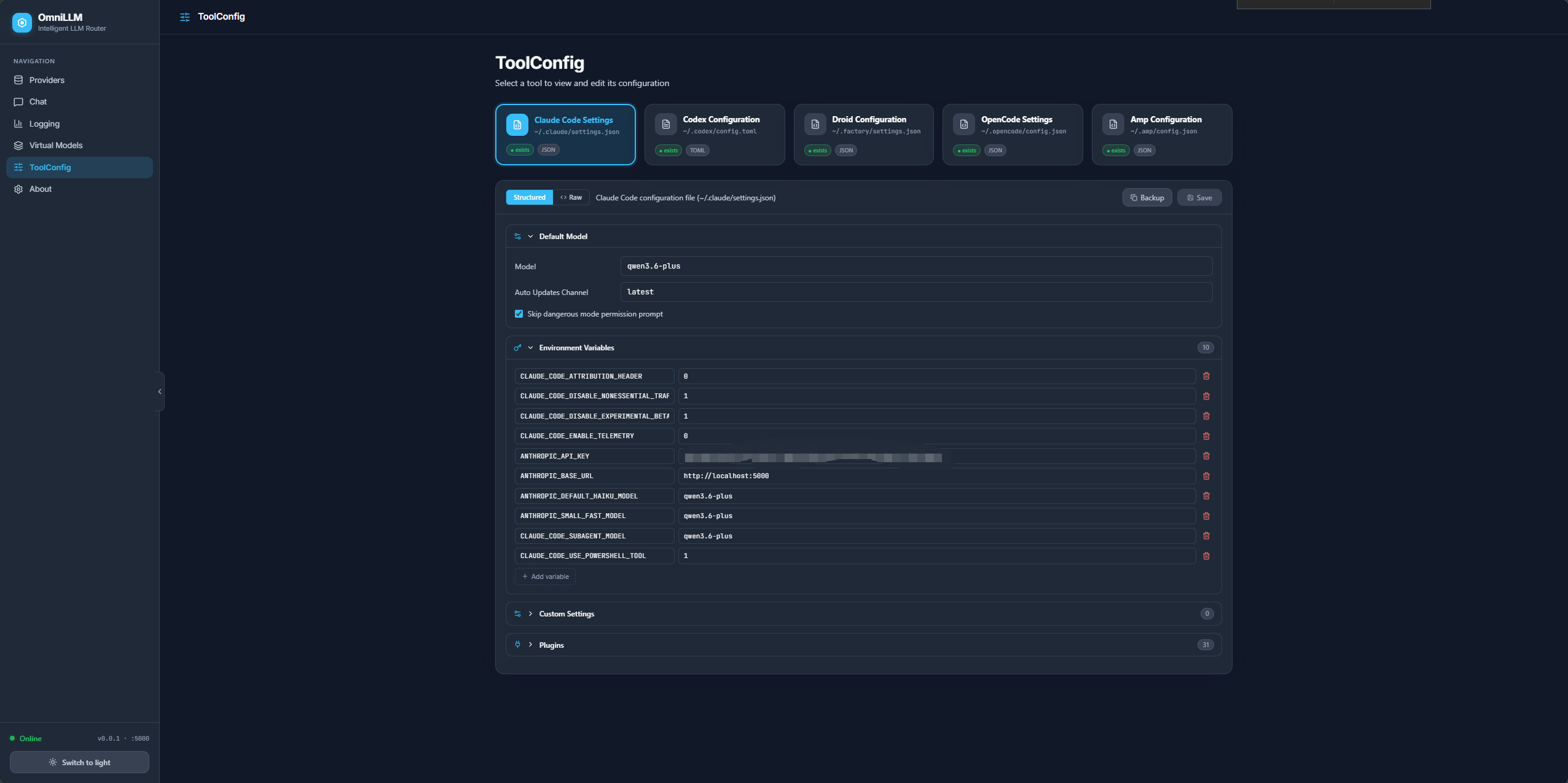
Supported Tools
| Tool | Config File | Template | Documentation |
|---|---|---|---|
| Claude Code | ~/.claude/settings.json |
Example | Official Docs |
| Codex | ~/.codex/config.toml |
Example | Official Docs |
| Droid | ~/.factory/settings.json |
Example | Official Docs |
| OpenCode | ~/.opencode/config.json |
Example | Official Docs |
| AMP | ~/.amp/config.json |
Example | Official Docs |
Features
- Structured Editors — Intuitive UI for editing configs without manual JSON/TOML editing
- Provider Dropdown — Droid config includes a dropdown for the 3 Droid-supported provider types: Anthropic (v1/messages), OpenAI (Responses API), Generic (Chat Completions API)
- Backup Button — One-click backup creates a timestamped copy in the same directory (e.g.,
~/.codex/config.20060102_150405.toml) - Template Files — Ready-to-use examples for quick setup (see all templates)
- Real-time Validation — Catch errors before saving
- Auto-create Files — Configs are created automatically if they don’t exist
- Import/Export — Backup and restore configurations
Quick Start with ToolConfig
- Start OmniLLM:
bun run omni start --enable-config-edit - Open ToolConfig UI:
- Navigate to http://localhost:5080/admin/
- Click ToolConfig in the sidebar
- Configure Your Tools:
- Click on any tool card (shows “○ new” if config doesn’t exist)
- Edit settings in the structured editor
- Click Backup (next to Save) to create a timestamped copy before making changes
- Click Save to persist changes
- Use Templates (Optional):
# Copy template to actual location
cp ~/.factory/settings.json.example ~/.factory/settings.json

# Or use ToolConfig UI to create automatically
Documentation & References
- Configuration Templates - Complete guide to all template files
- ToolConfig Fixes - Path fixes and save/reload improvements
- Structured Editors - Details on structured editor implementation
- Layout Improvements - UI/UX enhancements
Security Note
Config file editing is disabled by default for security. Enable it with the --enable-config-edit flag:
bun run omni start --enable-config-edit
This prevents unauthorized modification of AI assistant configurations when running OmniLLM as a shared service.
Operations and Troubleshooting
Common checks
- Confirm the service is listening on the expected port
- Open
/admin/and verify provider auth state - Run
bun run debugto inspect runtime paths and token presence - Run
bun run check-usagewhen validating Copilot quota behavior - Verify the active provider has available models before routing traffic
Common failure modes
| Symptom | Likely Cause | Action |
|---|---|---|
| No authenticated providers | Auth flow not completed | Run omnillm auth or authenticate in admin UI |
| 401 / Unauthorized | Expired or invalid provider credentials, or missing inbound API key | Re-authenticate provider; include Authorization: Bearer <api-key> in requests |
| No models returned | Provider auth incomplete or upstream issue | Recheck auth and provider availability |
| Rate-limit failures | Request volume exceeds configured threshold | Increase interval or use --wait |
| Endpoint rejected | SSRF protection blocking localhost/private IPs | Use --allow-local-endpoints for local services like Ollama |
Development
bun install

# Start backend + frontend (foreground)
bun run dev

# Custom ports
bun run dev --server-port 8080 --frontend-port 3000

# Background mode
bun run omni start
bun run omni stop

# Backend only (TypeScript)
bun run dev:server

# Frontend only
bun run dev:frontend

# Production build
bun run build

# Type check
bun run typecheck
Frontend source lives in frontend/ and uses Vite + React + Tailwind v4. In development mode, Vite proxies /api/*, /v1/*, and /usage to the Go backend.
The frontend auto-detects the backend port at runtime by probing known ports, so it works correctly even when served on non-standard ports.
License
MIT